
Axial Flux Motor Design Software: From Requirements to a Simulated Motor
By the Turncircles engineering team · Published
Designing an axial flux motor used to mean a finite element licence, a few months and a colleague who enjoys meshing. Our configurator does the electromagnetic design from your requirements in your browser: you enter torque, speed and voltage, and it returns a motor with simulated performance and a price.
This page explains what motor design software should do, why axial flux is harder for classic tools, what ours covers and when you should use something else.
Open the configurator See the software plans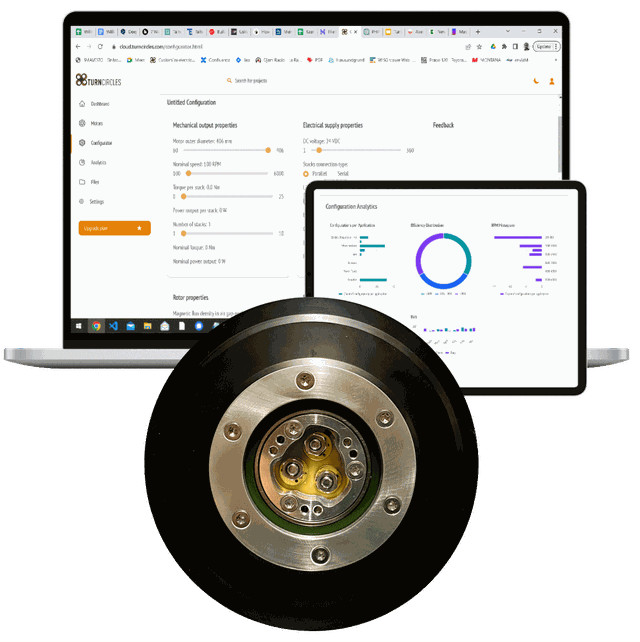
What Motor Design Software Has to Do
Designing an electric motor is a chain of questions, and software exists for every link. First: what torque, speed and voltage does the load need? Then: which size and winding could deliver it? Then: does the magnetic field really behave the way the sizing formula promised? Then: how hot does it get, and what does the structure around it look like? A tool that answers only one of these is useful. A tool that answers none of them in a way you can act on is a hobby.
| Stage | Question | Typical tool |
|---|---|---|
| Requirements | What does the load need? | Spreadsheet, power-torque-speed converter |
| Sizing | Which diameter, stacks, winding? | Analytical equations, parametric model |
| Electromagnetics | Torque, back-EMF, losses, saturation? | Finite element analysis (2D or 3D) |
| Thermal | How hot at continuous load? | Lumped thermal network, thermal FEA |
| Mechanical | Housing, bearings, interfaces? | CAD |
| Manufacturing data | What do we actually make? | Drawings, stator layout, bill of materials |
General-purpose finite element packages cover the electromagnetic row very well, if you already know how to set up the geometry, mesh, boundary conditions and post-processing. That is a skill, and it takes a while to acquire. Dedicated motor design tools wrap much of that for common machine types.
Why Axial Flux Needs Its Own Approach
Radial flux machines have a constant cross-section along the shaft, so a two-dimensional slice describes them well and 2D finite element tools are fast and accurate for them. An axial flux motor has its flux running parallel to the shaft, through a flat air gap whose width changes with radius. A single 2D slice cannot capture that. You need either a three-dimensional model or a stack of slices at several radii, plus the knowledge to interpret the results.
That is the main reason axial flux design tools are rarer than radial ones, and the reason a parametric, purpose-built tool saves so much time. For the topology itself, see the axial flux motor guide and the comparison with radial flux.
What the Turncircles Configurator Does
The configurator is our axial flux motor design software, and it runs in your browser. You describe the motor you need. It designs one.
- Inputs: outer diameter, nominal speed, torque per stack, number of stacks and supply voltage, plus rotor and winding properties for those who want to go deeper.
- Design: a parametric axial flux model with printed PCB or DCB stators, scaled to your inputs.
- Results: nominal torque and power, weight, simulated performance across the operating range, an efficiency map and a price estimate.
- Next step: the same design goes to engineering and manufacturing, so what you simulated is what gets built.
Under the hood, the simulation is three-dimensional finite element analysis, described on the axial flux motor simulation page. The Configurator Guide walks through each screen, and sizing your motor before you configure helps with the starting numbers.
A Permanent Magnet Motor Design Tool Needs to Get Three Things Right
If you are comparing tools for permanent magnet motors, these are the places where they differ most:
- Magnets. Grade, temperature behaviour, thickness and span decide the flux in the gap. Our free magnet selector lets you explore this without an account.
- Winding. Pole and slot combinations, turns and layout decide torque constant, harmonics and copper loss. The free winding calculator shows winding factors for common combinations.
- Losses. Copper, eddy current and, in cored machines, iron losses. A coreless stator has no iron losses at all, see coreless axial flux motors.
A tool that gives you a single efficiency number at the rated point is a brochure. A tool that gives you an efficiency map across torque and speed is a design instrument.
What It Costs to Start
Configuring is free, and foundational simulations are included in the free Community plan. Higher-fidelity simulation, engineering support and cloud features are on paid plans, listed on the design software plans page. If you decide to build the motor, pricing explains what you pay and when.
When You Should Use Something Else
Our software designs our motors. If you need to design a radial flux machine, an induction motor or a switched reluctance motor, use a general motor design suite or a finite element package. We would rather you used the right tool than a convenient one. If you need an axial flux motor, you can skip the learning curve and start from your requirements.
Frequently Asked Questions
What is the best axial flux motor design software?
It depends on what you are designing. For a Turncircles-style coreless axial flux permanent magnet motor, the Turncircles configurator designs, simulates and prices it from your torque, speed and voltage. For general machine research, a three-dimensional finite element package gives you full control at the cost of setup time.
Is there free axial flux motor design software?
Yes. Configuring a motor in the Turncircles configurator is free, and the Community plan includes foundational simulations. The magnet selector and winding calculator on this site are free and need no account.
Can I design an axial flux motor in a 2D FEA tool?
Only approximately. Axial flux machines have a flat air gap whose geometry changes with radius, so a single 2D slice misses effects that matter. Quasi-3D slicing or full 3D models are needed for reliable results.
What is a permanent magnet motor design tool?
Software that takes requirements such as torque, speed and voltage and returns a motor design: magnets, winding, dimensions, and predicted performance. A good one also shows efficiency across the operating range, not only at the rated point.
Do I need engineering experience to use the configurator?
You need to know what your application requires: torque, speed, voltage and the space available. The configurator handles the electromagnetic design. If you are unsure of the numbers, the motor selector guide helps.
Design your motor from the requirements
Free to configure, free to simulate on the Community plan.
Open the configurator Talk to an engineer