
Axial Flux Motor Simulation: Know the Performance Before You Build
By the Turncircles engineering team · Published
Building a motor to find out whether it works is the most expensive form of simulation. Ours runs in the cloud, in three dimensions, and answers the awkward questions first: how much torque, how much back-EMF, how efficient, and where.
This page explains what we simulate, how it works in plain language, how to read the results, and, just as important, what a simulation cannot tell you.
Simulate your motor for free See the plansWhat Gets Simulated
A motor on a spreadsheet is a promise. A motor in a three-dimensional finite element model is a prediction with a mesh attached. We simulate the magnetic field of your motor in three dimensions and read the quantities that matter out of it:
- Torque as a function of current and of rotor angle, including the angle where torque peaks.
- Back-EMF, the voltage the spinning rotor generates, which fixes the torque constant and the speed at your supply voltage.
- Losses, mainly copper and eddy current losses in a coreless stator.
- Efficiency at operating points across torque and speed, summarised as an efficiency map.
- Torque ripple, which decides how smooth the motor feels at low speed.
How It Works
The motor is modelled as a repeating sector, because a machine with 12 magnets and 9 coils repeats itself every few of them. The sector is meshed, the field equations are solved, and the results are scaled up to the full machine. That keeps solve times practical without pretending the machine is simpler than it is.
Different questions need different runs. Back-EMF needs the rotor turning with no current. Torque versus current angle needs the rotor held still with current applied. Efficiency needs the rotor moving with load. The configurator queues these for you and shows the combined result.
The finite element method itself is not new. What takes effort is the setup: geometry that is generated from parameters, a mesh that is good enough in the thin air gap, boundary conditions that make the sector behave like the whole disc, and checks that reject a bad mesh before it wastes your time. We have built that setup once so that you do not have to.
Reading an Efficiency Map
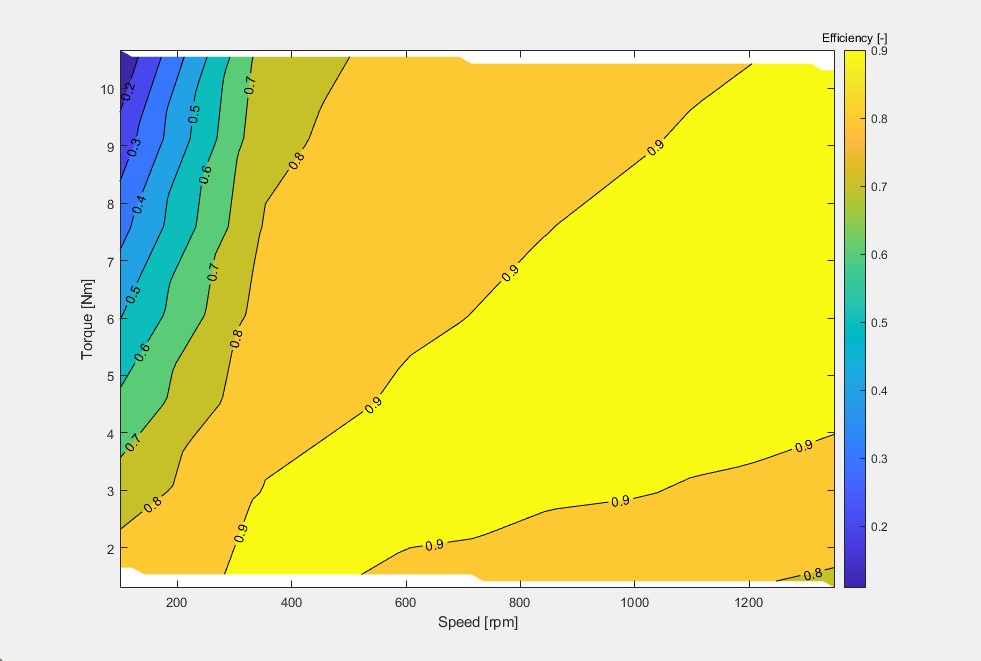
Efficiency is not one number. It changes with speed and torque, so a motor has an island of high efficiency and falls off outside it. A datasheet quotes the top of the island. Your application lives wherever its duty cycle takes it. The practical use of the map is to place the island over the operating points you actually use, which is something you can only do before the motor is built. Our efficiency definitions guide and efficiency map documentation go deeper.
A Worked Example: What Back-EMF Tells You
Back-EMF sounds like an obscure output, and it is one of the most useful. The back-EMF constant Ke (volts per radian per second) fixes how fast the motor can spin on a given supply. Say a simulation returns Ke = 0.10 V·s/rad. On a 48 V supply the no-load speed is about 48 / 0.10 = 480 rad/s, or roughly 4,600 RPM, before losses and drive limits take their share. The same constant, in SI units, is the torque constant: 0.10 Nm per ampere, so 5 Nm needs about 50 A.
Both numbers came from one simulation of one rotor turning with no current. That is why back-EMF is the first run in the queue, and why checking it against your supply voltage and speed is the quickest sanity test of a design.
Illustrative values, not a Turncircles motor.
What a Simulation Cannot Tell You
A simulation is a very confident colleague who has never touched the actual motor. It is excellent at relative questions (does a wider magnet help, what happens at higher current) and good at absolute ones, but it is still a model. Things it does not settle on its own:
- Manufacturing tolerances, magnet variation and air gap accuracy in the assembled motor.
- Thermal behaviour in your installation, which depends on how heat leaves your structure.
- Bearings, vibration, noise and everything mechanical.
- The controller you pair with it.
We would be suspicious of anyone quoting a simulation accuracy to three decimals, and you should be too. Use simulation to choose well and to avoid building the wrong motor, then confirm on the bench, which is what a first prototype is for.
Free, Foundational and Higher-Fidelity
Foundational simulations are included in the free Community plan, which comes with a token allowance for running them. Professional adds higher-fidelity simulation and more tokens. The plans page has the details, and pricing explains how a free simulation fits into a motor order: you pay for engineering only after the results convince you.
Not yet sure what to enter? Start with the motor selector guide, or read what axial flux design software should do.
Frequently Asked Questions
What is axial flux motor simulation?
It is the numerical prediction of a motor's behaviour, usually by three-dimensional finite element analysis of its magnetic field. From the field you obtain torque, back-EMF, losses and efficiency before any physical motor exists.
Why simulate in 3D?
An axial flux motor has a flat air gap whose width changes with radius and flux that runs parallel to the shaft. A 2D slice cannot represent that, so three-dimensional models (or at least several slices) are needed for reliable predictions.
How accurate is the simulation?
Accurate enough to choose between designs and to size a motor. It is still a model: tolerances, installation thermal conditions and the controller affect the real motor. We recommend confirming on a prototype.
How long does a simulation take?
It depends on the motor and the type of run. The configurator queues the runs and shows results as they finish, so you can keep working while they solve.
Is the simulation free?
Foundational simulations are included in the free Community plan, which comes with a token allowance. Higher-fidelity simulations are part of the Professional plan. See the plans page.
Predict, then build
Configure a motor and simulate it before you spend on engineering.
Configure your motor Talk to an engineer